
 About Us
 News
 Team
 Talent Development




















 Thought Leadership
 Blogs
 Events & Webinars
 Case Studies
 Video Case Studies
 Whitepapers
 Publications
 Visual Gallery
 Media Coverage
 Press Release
 User Groups

01. Why build this
With Snowflake Intelligence, a sales manager can ask “Which region’s revenue fell last quarter, and who approves a 9% discount?” in plain English. The answer comes from governed data, with the generated SQL and the cited policy shown alongside it. This walkthrough builds that assistant in five steps on Snowflake’s free TPC-H sample data.
Most AI analytics pilots stall on the data, not the model. Metrics are defined three different ways, documents sit outside the warehouse, and access rules don’t follow the data into the AI tool. The pattern below fixes that in order: curate the data, define business meaning once, index documents next to the data, then add the agent.

02. Architecture
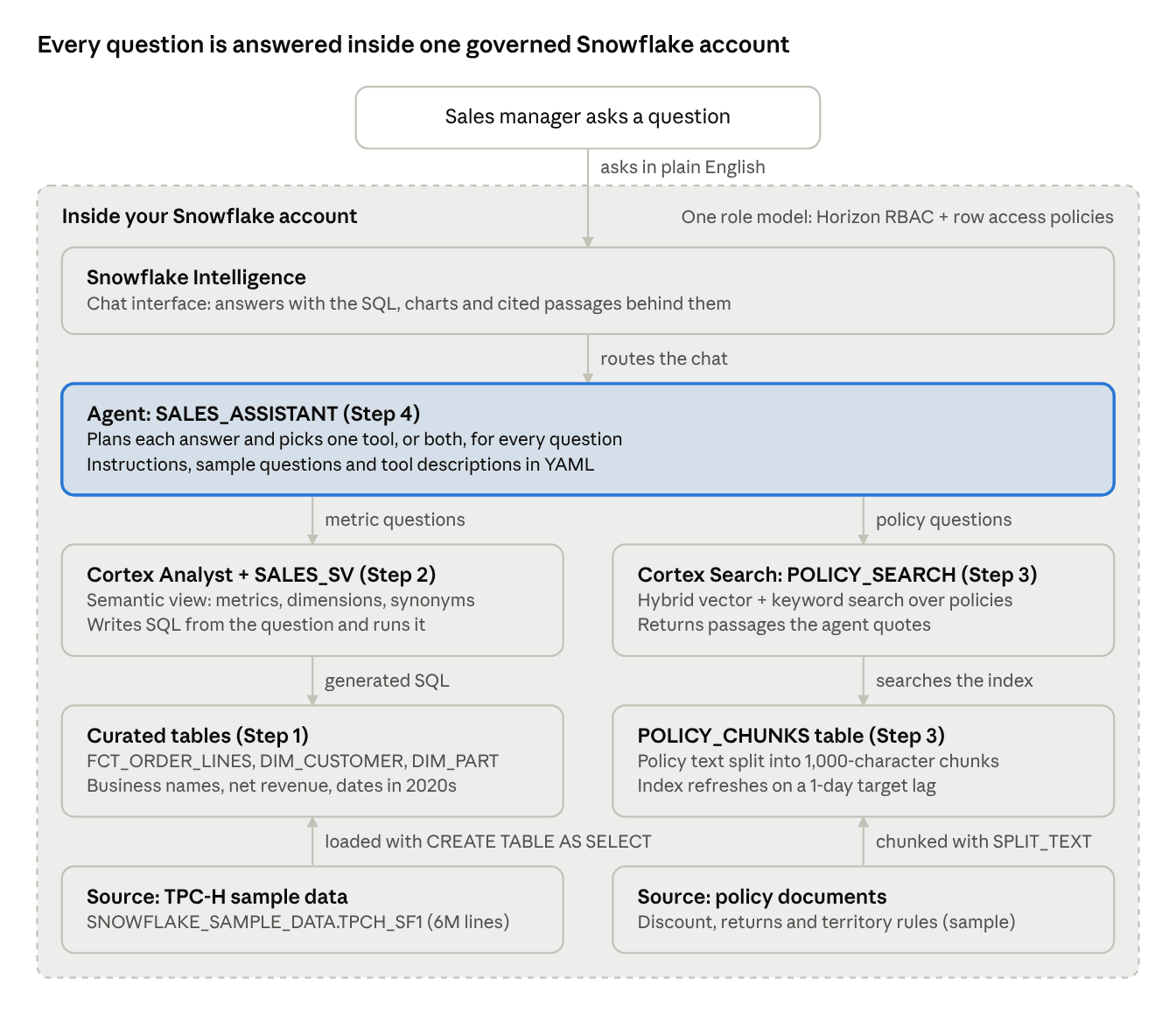
The build has two paths that meet at one agent. Sales data flows through curated tables and a semantic view to Cortex Analyst. Policy text flows through chunking to Cortex Search. Everything runs inside one Snowflake account, under one set of role grants.

03. Step 1: Curate the data
First, set up the environment. Create an engineer role and an analyst role, and grant SNOWFLAKE.CORTEX_USER to the analyst role. Add an extra-small warehouse with AUTO_SUSPEND = 60, and a SALES_AI database with CURATED, SEMANTIC and KNOWLEDGE schemas.
Then build one clean fact table. Give the columns business names and compute net revenue once. TPC-H dates run from 1992 to 1998, so shift them forward 28 years; otherwise “last quarter” returns nothing. Build DIM_CUSTOMER (with nation and region) and DIM_PART the same way.
CREATE OR REPLACE TABLE SALES_AI.CURATED.FCT_ORDER_LINES AS
SELECT l.l_orderkey AS order_key,
       l.l_linenumber AS line_number,
       o.o_custkey AS customer_key,
       DATEADD(year, 28, o.o_orderdate) AS order_date,
       l.l_discount AS discount_rate,
       l.l_extendedprice * (1 - l.l_discount) AS net_revenue,
       (l.l_returnflag = 'R') AS is_returned
FROM SNOWFLAKE_SAMPLE_DATA.TPCH_SF1.LINEITEM l
JOIN SNOWFLAKE_SAMPLE_DATA.TPCH_SF1.ORDERS o ON l.l_orderkey = o.o_orderkey;
In production, use dynamic tables fed by your CRM and ERP. Each source you bring into Snowflake becomes something the agent can answer questions about.

04. Step 2: Define business meaning in a semantic view
The semantic view records what “revenue” means, how tables join, and what words people use for each field. Cortex Analyst reads it to turn questions into SQL, and BI tools can reuse it. Most accuracy gains come from this step, not from the model.
CREATE OR REPLACE SEMANTIC VIEW SALES_AI.SEMANTIC.SALES_SV
  TABLES (
    order_lines AS SALES_AI.CURATED.FCT_ORDER_LINES
      PRIMARY KEY (order_key, line_number),
    customers AS SALES_AI.CURATED.DIM_CUSTOMER
      PRIMARY KEY (customer_key)
  )
  RELATIONSHIPS (
    lines_to_customers AS order_lines (customer_key) REFERENCES customers
  )
  FACTS ( order_lines.net_revenue AS net_revenue )
  DIMENSIONS (
    order_lines.order_quarter AS DATE_TRUNC('quarter', order_date),
    order_lines.discount_rate AS discount_rate
      COMMENT = 'Fraction 0 to 0.10; above 0.05 needs manager approval',
    customers.region AS region_name
      WITH SYNONYMS = ('territory', 'geography')
      COMMENT = 'AFRICA, AMERICA, ASIA, EUROPE or MIDDLE EAST'
  )
  METRICS (
    order_lines.total_revenue AS SUM(order_lines.net_revenue)
      WITH SYNONYMS = ('revenue', 'sales')
      COMMENT = 'Net revenue after discount; the default meaning of revenue',
    order_lines.return_rate AS SUM(IFF(is_returned, order_lines.net_revenue, 0))
      / NULLIF(SUM(order_lines.net_revenue), 0)
  );
Three rules improve accuracy. Define each metric once and say in its comment when to use it. Add synonyms for the words people actually use. List the allowed values in dimension comments, so the model doesn’t invent filters. Before connecting the AI, query the view with SELECT * FROM SEMANTIC_VIEW(…) and check the totals against your existing reports.

05. Step 3: Index policies with Cortex Search
Some questions, such as who approves a 9% discount, are answered in documents, not tables. Cortex Search indexes that text inside Snowflake with combined vector and keyword search. You don’t need a separate vector database or sync job.
Load the policy text into POLICY_CHUNKS, split with SNOWFLAKE.CORTEX.SPLIT_TEXT_RECURSIVE_CHARACTER; for PDFs, extract the text first with AI_PARSE_DOCUMENT. The sample policy is illustrative: reps approve discounts up to 5%, regional managers up to 10%, and the VP of Sales above that. Then create the service:
CREATE OR REPLACE CORTEX SEARCH SERVICE SALES_AI.KNOWLEDGE.POLICY_SEARCH
  ON chunk
  ATTRIBUTES doc_title
  WAREHOUSE = SALES_AI_WH
  TARGET_LAG = '1 day'
  AS (SELECT chunk, doc_title, doc_id FROM SALES_AI.KNOWLEDGE.POLICY_CHUNKS);

06. Step 4: Create the agent
The agent chooses Cortex Analyst for numbers, Cortex Search for policy, or both. Most of its value comes from precise instructions about which tool to use, what “revenue” means, and what date range exists.
CREATE OR REPLACE AGENT SNOWFLAKE_INTELLIGENCE.AGENTS.SALES_ASSISTANT
  PROFILE = '{"display_name": "Sales Assistant"}'
  FROM SPECIFICATION
$$
instructions:
  orchestration: >
    Use sales_analyst for revenue, discount, return and region questions.
    Use policy_search for approval rules and thresholds. For questions that
    need both, call policy_search first. Data covers Jan 2020 to Aug 2026.
  response: >
    Lead with the answer and its number. Revenue means net revenue.
    Name the policy document when quoting a rule.
tools:
  - tool_spec: { type: "cortex_analyst_text_to_sql", name: "sales_analyst",
      description: "Net revenue, discounts and return rate by date and region" }
  - tool_spec: { type: "cortex_search", name: "policy_search",
      description: "Discount approval, returns and territory policies" }
tool_resources:
  sales_analyst:
    semantic_view: "SALES_AI.SEMANTIC.SALES_SV"
    execution_environment: { type: "warehouse", warehouse: "SALES_AI_WH" }
  policy_search:
    name: "SALES_AI.KNOWLEDGE.POLICY_SEARCH"
    max_results: 3
$$;
GRANT USAGE ON AGENT SNOWFLAKE_INTELLIGENCE.AGENTS.SALES_ASSISTANT TO ROLE SALES_AI_ANALYST;
Analysts then open Snowflake Intelligence in Snowsight and select Sales Assistant.

07. Step 5: Test, and fix what breaks
Write 10–20 test questions and work out each correct answer in SQL. Compare the agent’s answers and generated SQL against them after every change. Expect these first-pass failures:
| Symptom | Cause | Fix |
|---|---|---|
| “Last quarter” returns nothing | Sample dates end in 1998 | Shift dates in Step 1; state the date range in the instructions |
| >Revenue figures disagree between answers | Gross and net amounts are both available | One total_revenue metric with synonyms, marked as the default |
| “North America” returns zero | The model invents a filter value | List allowed values in the comment; add a verified query |
| The approval question gets the wrong answer | Only SQL is called | Tell the agent to call policy search first; put the threshold in the discount_rate comment |

08. Governance, cost and why Snowflake
The agent runs every query with the user’s own role. A row access policy on FCT_ORDER_LINES limits a regional manager to their region, and the same rule applies in BI tools and SQL. To control cost, keep the warehouse extra-small with auto-suspend, add a resource monitor, set max_results low, and review Cortex usage weekly in SNOWFLAKE.ACCOUNT_USAGE.
Snowflake’s advantage is that the whole stack lives on one governed platform:
| Layer | Typical assembled stack | This build |
|---|---|---|
| Data | Extracts copied into an AI tool | Queried where it lives |
| Definitions | Spread across BI tools and prompts | One semantic view for AI and BI |
| Documents | Separate vector database and sync jobs | Cortex Search, refreshed automatically |
| Access | Rules rebuilt in each tool | One role model, enforced everywhere |
Teams that need custom model fine-tuning or heavily customised chat interfaces may still pair Snowflake with other tools. Open Iceberg tables mean the data stays usable outside Snowflake as well.

09. Next steps
Most of the work is data engineering and business definitions, not AI, and that is why the answers can be trusted. To apply this to your own data:
- Pick one domain and collect the 20 questions people ask analysts most often.
- Bring in the sources those questions need, and build the semantic view with the business owner.
- Launch to a small group with the test set running. Measure ad-hoc request volume and time to answer, before and after.